
Can I import an image I copied into the Sub View palette?
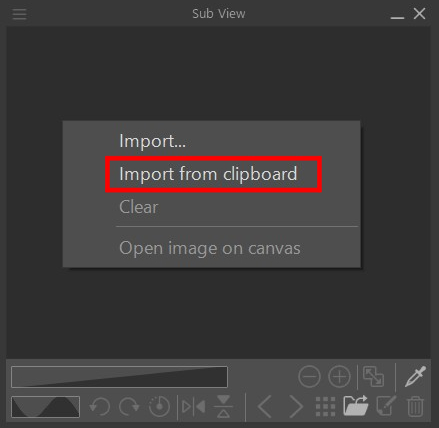
From the Sub View palette menu, you can use Import from clipboard to import clipboard images.
You cannot import an image copied from a web browser into the Sub View palette.
Save the image in a photos app or similar app, and import it following the steps listed here.
Procedure in Studio Mode
1. Open the Sub View palette.
2. From the Sub View palette menu, select Import from clipboard.
Tablets/Computers
Smartphones
3. The clipboard image will be imported.
You can also select this by right clicking within the Sub view palette, or from the menu that displays from a long-press.
Procedure in Simple Mode
1. Tap on ... in the upper right and then See reference images.
2. Tap on ... in the upper left and then tap on Import from clipboard.
3. The clipboard image will be imported.
If the feature doesn't display
This feature is limited to Ver. 5.0 or later.
Please update to a version after Ver. 5.0.
Check out which license is needed to use a later app version from the page below.
People who read this FAQ also viewed the below articles.